Changelog

What's new in Spronta

We ship suspiciously often. If we were a legacy SEO audit tool, we'd be a little concerned.

Core open-source crawler releases · Platform Spronta Cloud product updates

Platform #

Search Console as a plugin, issue history, and Search analytics

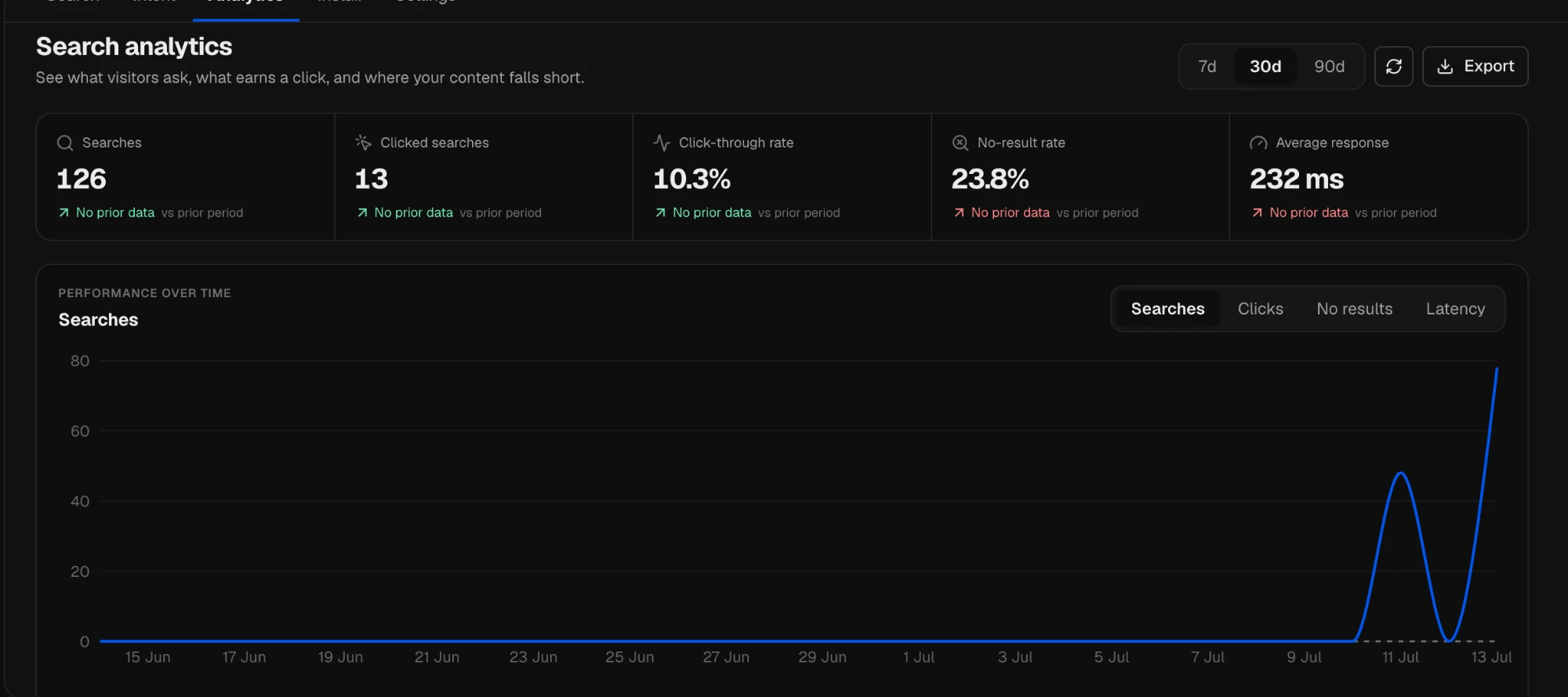
Spronta Search analytics showing searches, click-through rate, no-result rate and response time over 30 days

Three updates this week, one theme: closing the gap between what Spronta finds in a crawl and what actually happens to your site afterwards.

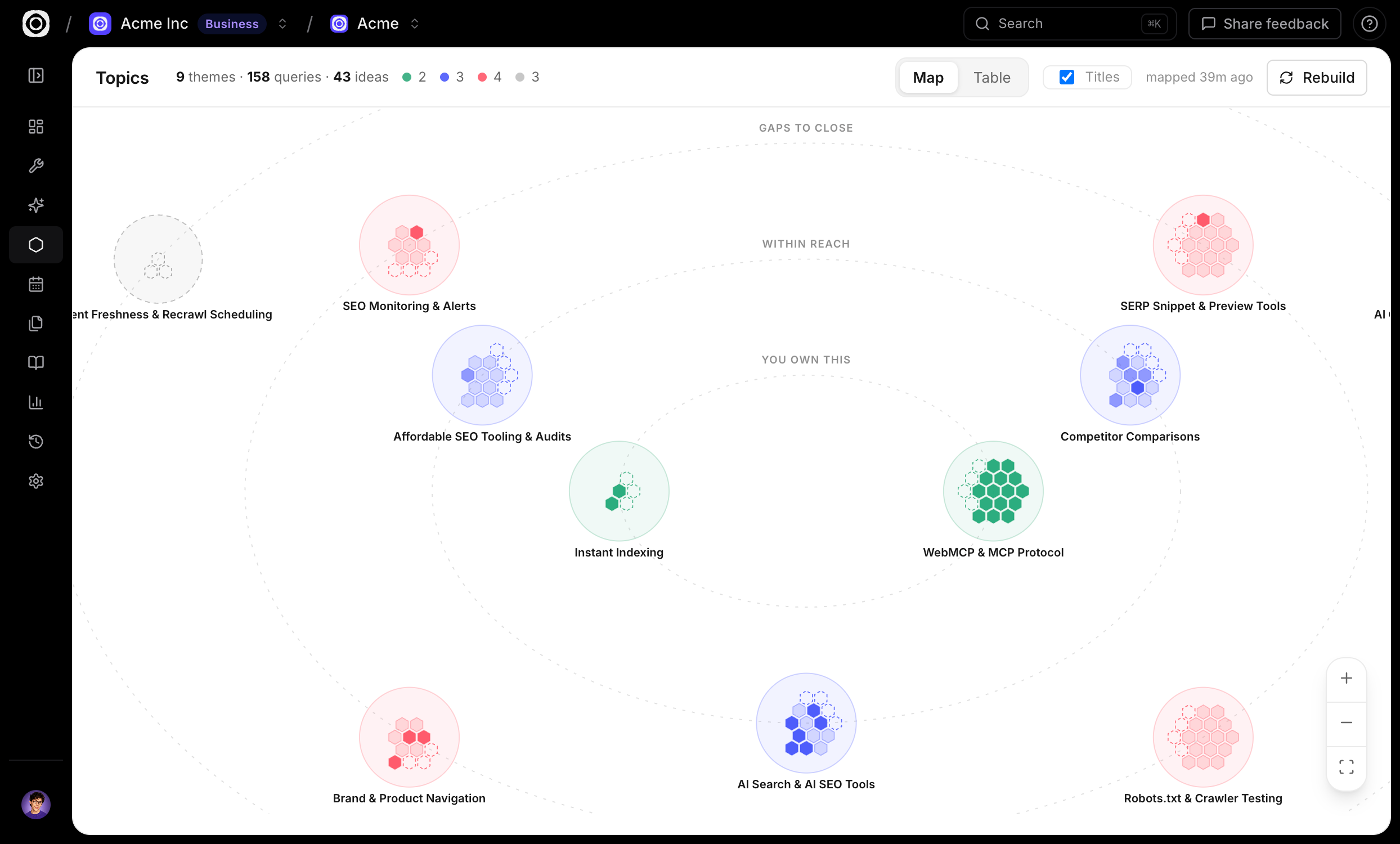
Google Search Console is now a plugin

A crawl tells you whether a page is healthy. Search Console tells you whether anyone finds it. Now you get both in one place.

  • Connect your sites in a couple of clicks. Open Plugins in app.spronta.com, connect Google, and link a verified property to a project. The permission is read-only — Spronta can’t touch your site or your Search Console settings.
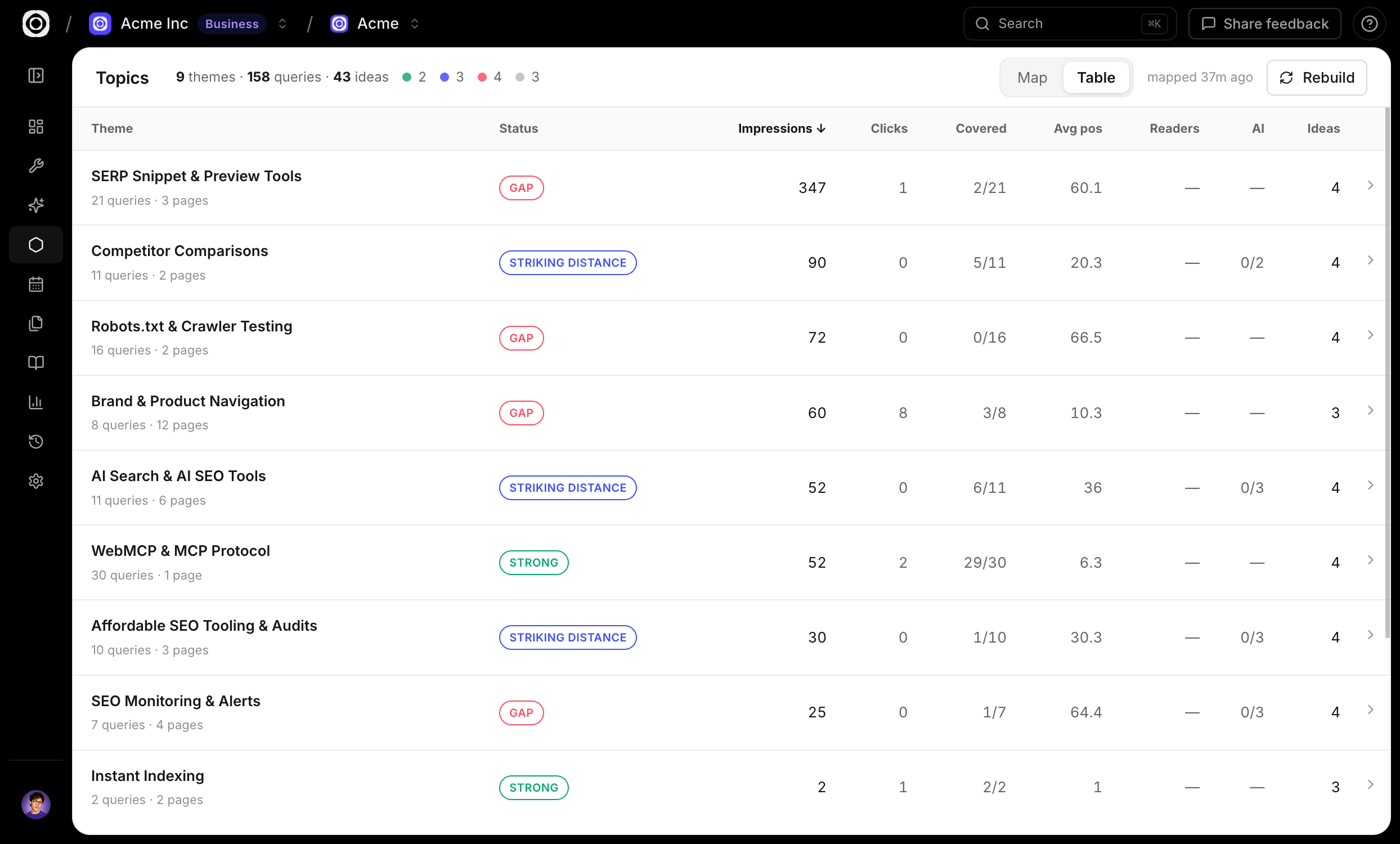
  • Google performance beside every crawled page. Clicks, impressions, click-through rate and average position, joined per URL in the Discoverability view of every report.
  • Insights, not just numbers. Spronta reads the two datasets together and flags patterns like visible, but under-clicked — a page ranking on page one whose snippet isn’t winning the click — so you know whether to fix the content or the title.
  • Agents get it too. With the plugin linked, the hosted MCP server’s search_performance tool joins live Google data onto any saved report.

Issue history: when it started, how it spread

Every issue now carries its own timeline, tracked across your crawls. You can see when it was first detected, when it last changed, and how the number of affected pages has moved crawl over crawl — so “did last week’s deploy cause this?” and “is it getting worse?” are answered right on the issue page, not by diffing old reports.

Spronta Search got an Analytics tab: searches and clicked searches over time, click-through rate, and response time, over 7, 30 or 90 days. Best of all is the no-result rate — the queries your visitors ran and got nothing back. That list is your content gaps, written by your own audience.

Explore Spronta Search → · Set up site search →

Platform #

Spronta is on the Vercel Marketplace

This one’s been on the wishlist since day one: Spronta is now on the Vercel Marketplace.

The idea is simple. Most SEO regressions don’t appear out of nowhere — they ship. A refactor drops a canonical tag, a template change swallows your titles, a redirect goes sideways. By the time a weekly crawl catches it, it’s been live for days. So we hooked Spronta straight into the thing that ships: your deploys.

How it works

  • Install from the marketplace, pick a project. Connect your Vercel account, choose which Vercel project to watch, and bind it to a Spronta project. That’s the whole setup.
  • Every production deploy triggers a crawl. Promotions and rollbacks count too — if production changed, Spronta takes a look. Chatty deploy pipelines are fine; we debounce to one crawl every 10 minutes.
  • Reports know which deploy they audited. Each deploy-triggered report shows the deployment, branch, and commit that kicked it off, so “what broke this” and “what shipped” are the same answer.
  • Regression alerts just work. Deploy crawls run through the same pipeline as scheduled ones, so your existing alerting fires if a deploy makes things worse.

One permission, and it’s read-only

The connector asks for exactly one thing: permission to read your Vercel project list, so you can pick which one to watch. It never writes anything to your account.

Install it from the Vercel Marketplace → · Setup guide →

v0.5.3 Core #

Spronta can see your accessibility problems now — and it won’t let them hide inside your SEO score.

Added

  • Accessibility pillar (WCAG). Seven new checks for the accessibility bugs lurking in your markup: links and buttons with no accessible name (hello, icon-only buttons), form fields with no label, iframes with no title, zoom-blocking viewports, positive tabindex, and skipped heading levels. No rendering or contrast guesswork — just the failures that are decidable from the HTML, so no false alarms.
  • A separate Accessibility score — a third number out of 100, on purpose. Accessibility problems don’t drag down your technical-SEO score, and SEO problems don’t hide your accessibility ones. It shows in the CLI, the JSON (a11yScore), the HTML report, and as a third score ring in the desktop app.
  • Accessibility in history and diffs. Saved reports and crawl-over-crawl comparisons track the a11y score too, so you can watch it climb over time — in the CLI, the diff_reports MCP tool, and the desktop compare view.

That’s Spronta up to 57 checks across SEO, GEO and accessibility.

v0.5.2 Core #

Internal link graphs, and Spronta stops tripping over the www redirect.

Added

  • Internal link graph. Every crawl now maps how your pages link to each other: orphan pages (nothing links in), dead ends (nothing links out), reciprocal links, click depth, and your biggest hubs and highest-authority pages by internal PageRank. It shows in the CLI summary and the JSON (linkGraph), agents can query it with the new link_graph MCP tool, and the desktop app has a new Link graph tab you can drag, zoom, and click into.
  • dead-end check. Flags indexable pages with no internal outlinks: visitors and crawlers arrive and can’t go anywhere, and the page passes none of its authority on.
  • --no-resolve-host flag (and resolveHost in config / the MCP) to skip canonical-host resolution and audit the literal start host.

Changed

  • Crawls resolve to the canonical host by default. If your start URL redirects to another host (apex to www, or http to https), Spronta re-bases the audit on the destination and tells you it did, instead of auditing a host that only redirects. The same thing Screaming Frog and Sitebulb do.
  • Desktop: a page opens as a full view with a breadcrumb, not a side drawer. Saved Reports gained a sticky header, per-site favicons, and a fixed compare layout.

Fixed

  • robots.txt, sitemap.xml and llms.txt behind a redirect are detected now. Sites that 301/308 these files from the apex to www (or http to https) were wrongly reported as missing. Spronta now follows the redirect, the way search engines do. Thanks to @fakebizprez for reporting it (#3).
v0.5.1 Core #

The desktop app got a glow-up, and Spronta finally learned some manners about what not to crawl.

Added

  • JavaScript rendering, now in the desktop app. The --render superpower from 0.5.0 is a one-click toggle in the crawl settings, so you can audit React, Vue and Next sites without ever opening a terminal. (The CLI and MCP have had it all along.)
  • Exclude hosts and paths, by plain text or regex. Tell Spronta what to skip (analytics domains, share links, endless faceted URLs) from the new Advanced settings, the CLI (--exclude-host, --exclude-path, plus their -regex cousins), or the crawl_site MCP tool. A bad regex fails fast instead of silently matching nothing.
  • Global crawl defaults. Set your user agent, crawl budget, render mode and friends once in Settings, and every new crawl starts from there. Override per crawl whenever the mood strikes.
  • Custom user agent, surfaced in the desktop Advanced settings (the CLI and MCP already had it).

Changed

  • The desktop app looks like it is from this decade. A flat, Linear-style interface: a rounded content panel, a full-width sticky report header, a Pages table that finally uses the whole window, dark mode that moved into Settings and actually remembers your choice, and a Docs link in the sidebar.
  • The Overview dashboard means something at a glance. Issues by category is a stacked severity bar, and Status codes and Crawl depth are colour-coded proportion strips instead of a row of identical grey bars.
  • Default user agent is now crawlie (+https://crawlie.dev) (unversioned, and pointed at the right place).

Fixed

  • Sidebar links open now. Docs, GitHub and the update Download links open in your default browser instead of quietly doing nothing inside the app.
v0.5.0 Core #

JavaScript rendering — Spronta now sees what your users (and Google’s renderer) see.

Added

  • JavaScript rendering — crawl with --render and Spronta drives a real headless browser, lets each page hydrate, and audits the post-JavaScript DOM. Content, links and meta tags injected by React, Next.js, Vue and other client-rendered frameworks are now seen instead of missed, so every one of Spronta’s rules works on modern JS apps. Add --render-wait <ms> to wait for late-hydrating content. Uses your installed Chrome / Chromium / Edge (set $CHROME to pin one). Agents get it too via render: true on the crawl_site MCP tool. See the docs.
  • content-requires-js rule — Spronta compares the raw server HTML against the rendered DOM and flags pages whose content only exists after JavaScript runs. That’s a real risk: Google renders JS on a delayed, budget-limited second pass, and most AI answer engines don’t run it at all — so a client-only page can be near-invisible to the very engines you want to rank and be cited in.

Changed

  • More accurate content metrics — body word count, thin-content detection and the text-to-HTML ratio now exclude the contents of <script>, <style>, <noscript> and <template>, so inline JavaScript and JSON data no longer inflate a page’s apparent word count.
v0.4.2 Core #

Custom extraction lands, plus a brand refresh.

Added

  • Custom extraction — pull any data off every crawled page with CSS selectors or regular expressions: prices, authors, SKUs, publish dates, any attribute. crawlie crawl <url> --extract 'price=.product-price' (append @attr to read an attribute) or --extract-regex 'sku=SKU-(\d+)', repeatable. With extractors set, --format csv becomes a tidy table (one row per page, one column per extractor); --format json carries the values per page. Agents get it too via the extract array on the crawl_site MCP tool. The free, scriptable take on Screaming Frog’s Custom Extraction — see the docs.

Changed

  • New brand — Spronta has a fresh logo. The new mark and wordmark lockup appear across the desktop app and the website (light/dark aware), with a new app icon and a theme-aware favicon.
v0.4.1 Core #

Polishes 0.4.0: streamed crawls are now inspectable, and you can compare crawls right in the desktop app.

Added

  • crawlie store <db> — inspect a streamed crawl from the command line. crawl --store now writes a complete, self-contained database (pages, findings, and summary), and crawlie store renders it in any format (pretty, json, csv, html) with the same --severity / --output flags as report.
  • Compare crawls in the desktop app — a new Compare mode in Saved Reports: pick two crawls and see health/GEO score deltas, pages added and removed, and the issues that were resolved or newly appeared — the same crawl-over-crawl diff available via crawlie diff and the MCP diff_reports tool.

Changed

  • crawl --store together with --save no longer writes an empty entry to report history — the streamed database is the artifact (inspect it with crawlie store).
  • Docs: added pages for crawlie diff, streaming crawls / crawlie store, the diff_reports MCP tool, and structured-data validation.
v0.4.0 Core #

Crawl bigger, see what changed, and validate your structured data — this release closes three of the biggest gaps between Spronta and the heavyweight desktop crawlers.

Added

  • Crawl any size of site, without running out of memory — the new streaming engine (crawlie crawl --store <path>) spills every page to an on-disk SQLite database as it crawls, then runs the full audit by streaming pages back one at a time. The crawl file is the artifact: peak memory stays bounded by a compact index instead of the whole site, so large crawls no longer mean the whole site in RAM.
  • Crawl-over-crawl diffingcrawlie diff <old> <new> shows exactly what changed between two crawls: health and GEO score deltas, pages added and removed, and issues that newly appeared or were resolved (grouped by rule). The same is available to agents via the MCP diff_reports tool, and to the desktop app. Verify a fix actually landed, or catch a regression before it ships.
  • Structured-data validation — Spronta now parses your JSON-LD properly (including @graph and nested types like an Offer inside a Product) and checks each item against Google’s rich-result requirements. New findings flag invalid JSON-LD that search engines silently skip, missing required fields that make a rich result ineligible, and missing recommended fields that leave it weaker than it could be — across Article, Product, Recipe, Event, FAQ, Breadcrumb, JobPosting, LocalBusiness, and more.

Changed

  • Saved reports now live in SQLite — crawl history is stored in a single queryable crawlie.db instead of loose JSON files. Existing reports are imported automatically the first time you run this version; nothing to do.
v0.3.0 Core #

The biggest release yet: Spronta gains a deterministic content-quality engine, self-updating apps, and its own changelog.

Added

  • .crawlie rule packs — a deterministic, editable, agent-writable way to catch AI slop and off-brand copy. Rules are literal phrases, regexes, and text statistics (sentence burstiness, em-dash density, filler ratio, lexical diversity, repeated phrasing) — no model at runtime, so results are reproducible on every run. The new crawlie-rules engine is pure Rust and compiles to WebAssembly, so the same pack runs on your laptop, in CI, and in the cloud.
  • crawlie slop — score a whole site, a file, or stdin against a rule pack. You get an explainable ledger of exactly which rules fired and the evidence (--format json for agents), and you can gate your build with --fail-on-score.
  • Installable rule packscrawlie init scaffolds an editable pack in your repo; crawlie pack add / list / new / which / remove manage packs across three layers (repo .crawlie/, global ~/.crawlie/packs, and built-in). Ships with a tunable slop-default pack you can copy and make your own.
  • CLI self-updatecrawlie update checks for a newer release and installs it in place (--check to only look, -y to skip the prompt). A quiet nudge appears when you’re behind.
  • Desktop auto-update — the app now prompts when a new version is available and updates in-app in one click (download → install → restart). A new Settings area lets you toggle check on launch and fully automatic updates.

Changed

  • New app icon — the desktop app now wears the crawl-graph brand mark, matching the site and favicon.
  • Changelog moved to its own page — release notes now live at spronta.com/changelog with a dedicated, search-friendly page per release, plus an email subscribe option so you hear about new versions.

Fixed

  • Accurate compression auditing — Spronta now advertises Accept-Encoding and decodes gzip / Brotli / deflate itself, so the “no compression” check reflects what a server actually sends instead of being masked by the HTTP client’s transparent decompression.
  • Page body text is now exposed to content checks (previously only aggregate word counts were available).
v0.2.1 Core #

Changed

  • Renamed the npm package to crawlie (unscoped) — install with npm i -g crawlie. Platform binary packages stay scoped (@spronta/crawlie-<platform>), and the previous @spronta/crawlie package remains published as an alias.
v0.2.0 Core #

Added

  • Agent Skills — four standalone Agent Skills in skills/ (seo-site-audit, fix-broken-links, pre-launch-seo-check, geo-ai-readiness) that teach any agent to run real audits. Each is self-contained: it needs neither the repo nor a pre-installed Spronta, bootstrapping the binary on demand via npx -y -p crawlie and preferring the MCP tools when present.
  • Claude Code plugin.claude-plugin/ manifest bundling the Spronta MCP server (auto-run via npx) plus the skills, installable in one step (claude plugin marketplace add spronta/crawlieclaude plugin install crawlie@spronta).
  • Per-page SEO scores (Yoast-style) for every crawled page.
  • PageRank link scores, a prioritized Top Fixes list, and llms.txt detection.
  • Interactive drill-downs on the overview charts.
  • New-release detection banner and a draggable results header in the desktop app.
  • Crawl date/time shown in the results header.

Changed

  • MCP: compact, agent-first tool responses plus report-slicing tools (list_reports / get_report) for reading saved crawl history.
  • Issue filter chips now use Lucide severity icons; header gained a theme-aware accent bar.

Fixed

  • Self-heal stale scores when loading saved reports.
  • Load older saved reports correctly (serde defaults for newly added score fields).
  • GEO score was being computed against empty default signals (always ~8); now scored against real signals.
  • Window dragging on the desktop app (core:window:allow-start-dragging) and centered traffic-light controls.
v0.1.1 Core #

Added

  • Initial public release: the Spronta engine (crawlie-core), CLI (crawlie), and stdio MCP server (crawlie-mcp), shipped via npm as crawlie, plus a signed/notarized macOS desktop app.
  • ~40 technical-SEO and GEO (AI-search) checks, Health + GEO scoring, and plain-English fix guidance for every rule.